Guide 2 · Two ways to make a code
A square code, or a code in your picture
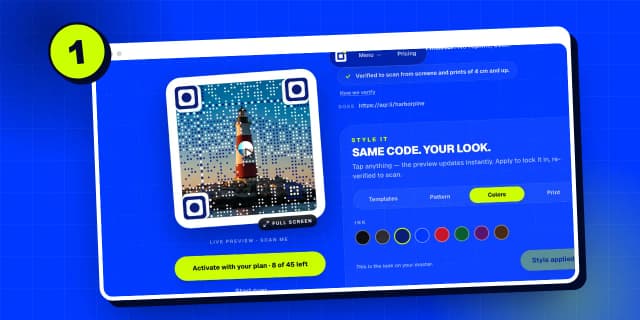
When to crop your picture into a square code, and when to keep the whole picture and place a code inside it, sized and positioned where it scans best.
Spoken in English, with subtitles in 49 languages. Recorded on the live product with Harbor & Pine Hotel, a demo account.
Step by step
Step 1
Open the generator
Open the generator from your dashboard, with “New picture code”.
Step 2
Upload a wide photo
This time, upload a wide photo. Here, the hotel’s harbor at sunset.
Step 3
Square code
“Square code” is the first choice. Your picture is cropped to a square, and the whole square becomes the code.
Step 4
Code in your image
“Code in your image” keeps your whole picture, and places a scannable code inside it.
Step 5
Move the code
Click “Move the code” to choose where it goes.
Step 6
Resize and position it
Make it bigger with the slider, then drag it onto a calm part of the picture, like this sky.
Step 7
Border or no border
“Light border” adds a thin band around the code, best for print. “No border” suits screens.
Step 8
Place the code
Click “Place the code here”. The rest of your picture stays exactly as it is.
Step 9
Add the link
Add the link, just like a square code.
Step 10
Generate
Click “Generate”. The code is checked right where it sits, inside your picture.
Step 11
Your picture, verified
Here’s your whole picture, with the code in the sky, verified in place.
Step 12
The code on its own
You also get the code on its own, as a square, for stickers and small prints.
Step 13
Which one to choose
Which one? Square codes suit menus, cards and stickers. A code in your picture suits posters, flyers and screens. Activate either one the same way.

Search all guides
Language: English
Language
- English
- Español
- Português
- Français
- Deutsch
- Italiano
- Nederlands
- Polski
- Türkçe
- Русский
- Українська
- العربية
- فارسی
- עברית
- اردو
- हिन्दी
- বাংলা
- தமிழ்
- తెలుగు
- मराठी
- ગુજરાતી
- ಕನ್ನಡ
- മലയാളം
- Bahasa Indonesia
- Bahasa Melayu
- Tiếng Việt
- ไทย
- Filipino
- 日本語
- 한국어
- 简体中文
- 繁體中文
- Svenska
- Dansk
- Norsk
- Suomi
- Čeština
- Română
- Magyar
- Ελληνικά
- Slovenčina
- Slovenščina
- Hrvatski
- Srpski
- Български
- Lietuvių
- Latviešu
- Eesti
- Kiswahili