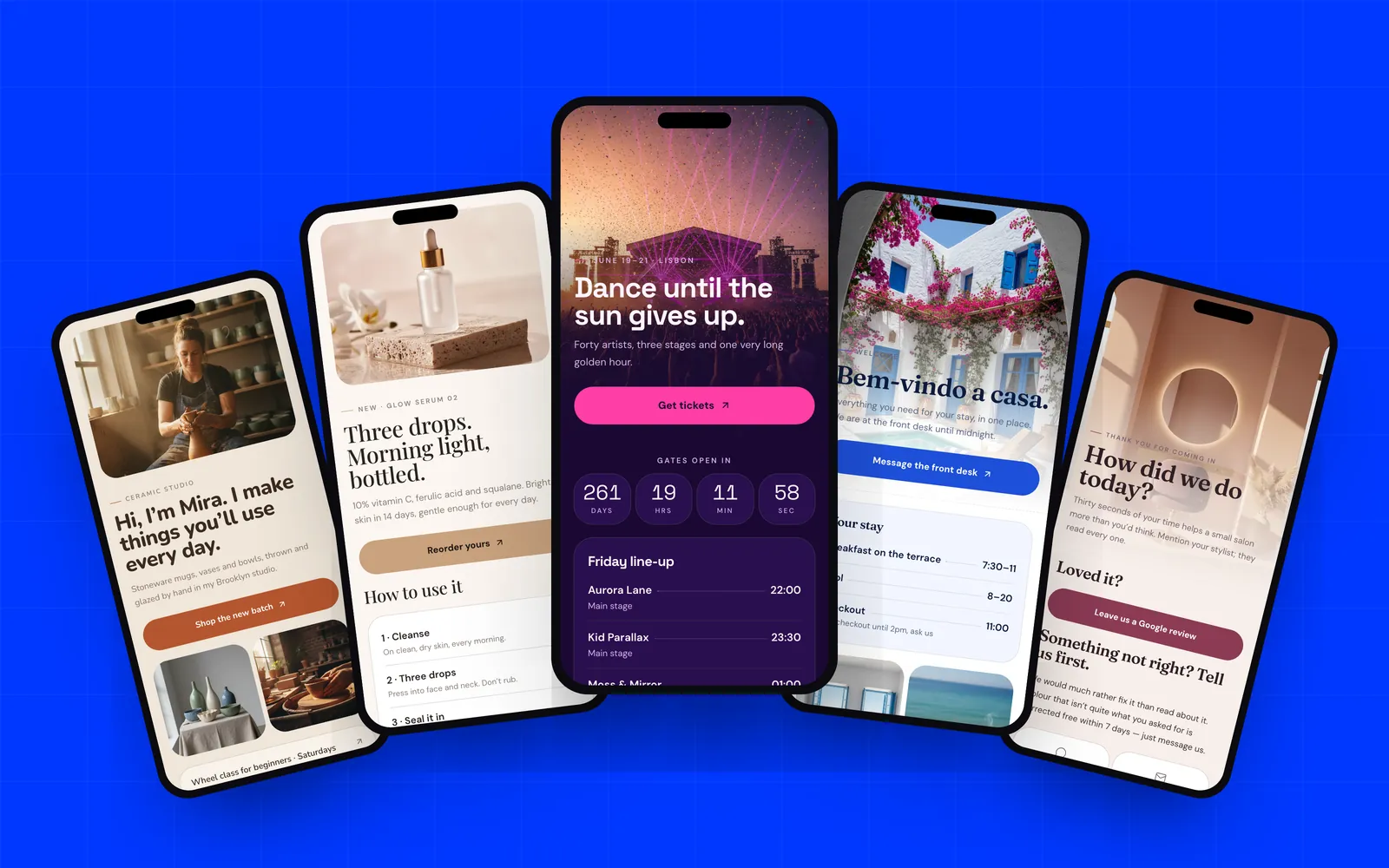
The QR code landing pages that work do one job, put the button where the thumb already is, and use the brand's own photos. Below are 12 QR code landing page examples, all real templates you can open and edit on AriaQR: where each code is printed, what the page leads with, its main button, and why it works.
What does a good QR code menu page look like?
Ember & Oak (restaurant menu). Printed on table tents. The page opens on a photo from the oven under "Tonight's menu," then the menu in two short lists, a small gallery, a birthday dessert offer, and the address and phone. The main button is "Book a table." It works because the guest is already seated, so the menu is one scroll away and the button asks for the one thing a tent can still earn: the next visit.
Casa Azul (hotel guest guide). Printed on the in-room card. It leads with a welcome, then breakfast, pool and checkout times, a gallery, a spa offer, links to the menu, a boat trip and a review, and a map. The main button is "Message the front desk," which opens a chat. It works because the questions guests ask at ten at night are already answered, and the one that is not goes straight to a person. For the other codes a venue needs, see restaurant and hotel QR codes.
What should the code on product packaging open?
Lumen (product launch). Printed on the box. It leads with the product and a one-line promise, then three steps for using it, a close-up, a short FAQ, and a refill offer for people who scanned the box. The main button is "Reorder yours." It works because the person holding the box has just bought. Instructions come first, the FAQ heads off support emails, and the reorder is the natural next sale.
Altitude Coffee (packaging). Printed on the coffee bag. It leads with the lot and the farm: origin, the family who grew it, tasting notes. Then a brew guide, a photo of the cherries, a founder's quote and a button to meet the farmers. The main button is the subscription. It works because the brew guide brings people back to the bag, so the code gets scanned more than once, and a repeat scan is when a subscription ask lands. More in branded QR codes for packaging.
What goes on a QR code event page?
Solstice Nights (festival). Printed on posters and wristbands. It leads with the dates and city, a countdown to the gates, the Friday line-up with stage times, links to the map, travel and lost and found, and an FAQ on re-entry and water. The main button is "Get tickets." It works because one page serves before and during: the poster sells, the wristband helps. On the first morning, move the map above the tickets, and every printed wristband follows.
Kestrel Labs Offsite (company offsite and gala). Printed on the invitation card and the lanyard. It leads with the dates and venue, then a countdown to the gala dinner, the agenda, a grid for dress code, rooms, coaches and dietary needs, an FAQ and a map. The main button is "Confirm your place." It works because it answers the questions every attendee would otherwise email the organizer. The same shape suits a private event; see wedding QR codes.
Which landing pages work for listings and business cards?
The Cliff House (property listing). Printed on the yard sign. It leads with a full-bleed photo and the facts in one line: bedrooms, baths, square feet, acreage. Then key features, an interior shot, links to the floor plan and a 3D walk-through, and the agent's contact. The main button is "Book a private viewing." It works because a buyer driving past wants the numbers and the plan before calling anyone. The real estate guide covers signs and open houses.
Kofi Mensah Studio (photographer card). Printed on a business card. It leads with a profile: photo, role, a short bio, contact details and a one-tap save to contacts. Then recent work, three ways to work together, and social links. The main button is "Check dates and book a shoot." It works because for a creative the work is the pitch. Three images appear before any sales copy.
Mira Clay (creator profile). Printed on market-stall signs and cards. It leads with "Hi, I'm Mira" and a short maker's intro, then a gallery, links for a beginner class, commissions and wholesale, a customer quote and socials. The main button is "Shop the new batch." It works because a shopper who did not buy at the stall can buy that evening, and one code serves students, commission clients and shops.
What landing pages work for coupons, reviews and app downloads?
Brick & Blister (coupon). Printed on a letterbox flyer and the pizza-box sticker. It leads with the deal in five words, "Two pizzas. Pay for one," then a countdown, the offer code, the menu, and the terms in plain text. The main button is "Order now." It works because the deal, the clock, the code and the button come first, with nothing between the flyer and the order.
Studio Velour (review page). Printed on a card at the salon mirror. It leads with "How did we do today?" and splits into two paths. Loved it: one Google review button. Something not right: tell us first, with a promise to fix it and a chat or email link. A thank-you offer and a rebook button close it. The main button is "Leave us a Google review." It works because unhappy clients get a better place to go than a public review, and happy ones get one button.
Vantra (app download). Printed on gym posters and flyers. It leads with the free trial and a one-line promise, then three reasons to try it, App Store and Google Play links, and an FAQ on the trial, beginners and offline use. The main button is "Start your free trial." It works because a poster cannot know which phone is scanning, so the page offers both stores and answers the trial question up front.
What do good QR code landing pages have in common?
- One job in the hero. Each page says what it is for in the first screen: tonight's menu, the deal, the welcome.
- The button where the thumb is. The main action sits near the top, not at the end of a long scroll.
- Real photos. The dish, the room, the product, the work. Stock photos read as an ad.
- Short copy. Lists and one-line answers, because people read these standing up.
- Fast. Nothing between the scan and the content.
- Changeable after printing. Menus, dates and offers change. The page should change while the print stays put.
Where the code should point in the first place is covered in what should a QR code link to.
How do the examples compare?
| Page type | Printed on | Leads with | Main button |
|---|---|---|---|
| Restaurant menu | Table tent | Tonight's menu | Book a table |
| Hotel guest guide | In-room card | Welcome and stay times | Message the front desk |
| Product launch | Box | How to use it | Reorder yours |
| Packaging | Coffee bag | The farm and lot | Subscribe |
| Event | Poster, wristband | Dates and countdown | Get tickets |
| Offsite invitation | Invite card, lanyard | Dates, venue, agenda | Confirm your place |
| Property listing | Yard sign | Photo and key facts | Book a private viewing |
| Business card | Printed card | Profile and save contact | Check dates and book a shoot |
| Creator profile | Stall sign, card | The maker and the work | Shop the new batch |
| Coupon | Flyer, box sticker | The deal and a clock | Order now |
| Review page | Card at the mirror | How did we do? | Leave a Google review |
| App download | Poster, flyer | Free trial | Start your free trial |
Should you use a QR code landing page template or start from a brief?
Either works. AriaQR has 66 templates, each a complete page with real copy; browse them in the landing pages templates section. Or give the AI designer a short brief and it designs the page: layout, palette, fonts and copy, with marked spots for your own photos. It never uses stock or generated photos.
Then edit in the block editor, or ask the AI to rewrite the copy or restyle the page. Publish at ariaqr.com/p/your-name or your-name.ariaqr.com. Every link is checked before the page goes live. The printed code keeps its short link, so the page can change without reprinting, and each page reports taps without cookies; tracking taps after the scan explains what to read. The code itself is verified on real decoders under real-world conditions before download.
Building and previewing is free. Publishing, the AI designer and subdomains are part of the Business plan; see pricing.
Where to start
Pick the example closest to where your code will be printed and start from that template. Swap in your own photos, cut the copy to what someone standing up will read, and make sure the button near the top is the action you want. Preview it on your phone, then print a test code and scan it where it will live.