Why do QR codes have three squares in the corners, whatever else they look like? Because those squares are how your phone finds the code: they tell the camera where the code is, how big it is and which way up it sits, so it can read it from almost any angle.
Here is what each square does, why the fourth corner is empty, and why a picture QR code still keeps them clear.
Why do QR codes have three squares in the corners?
The three squares are called finder patterns. You will also see them called position markers, or "eyes" in design tools. They sit in the top-left, top-right and bottom-left corners of every standard QR code.
Their job is to be impossible to miss. Each one is a dark square, inside a light ring, inside a dark ring. That nested shape looks the same whether a scanner sweeps across it from left to right, top to bottom or on a diagonal.
It is also a shape that rarely turns up by accident in ordinary print, photos or text. So even in a busy camera frame, full of tables, hands and menus, the phone can pick out the three squares quickly.
Once the phone has found all three, it already knows most of what it needs before it reads a single piece of data.
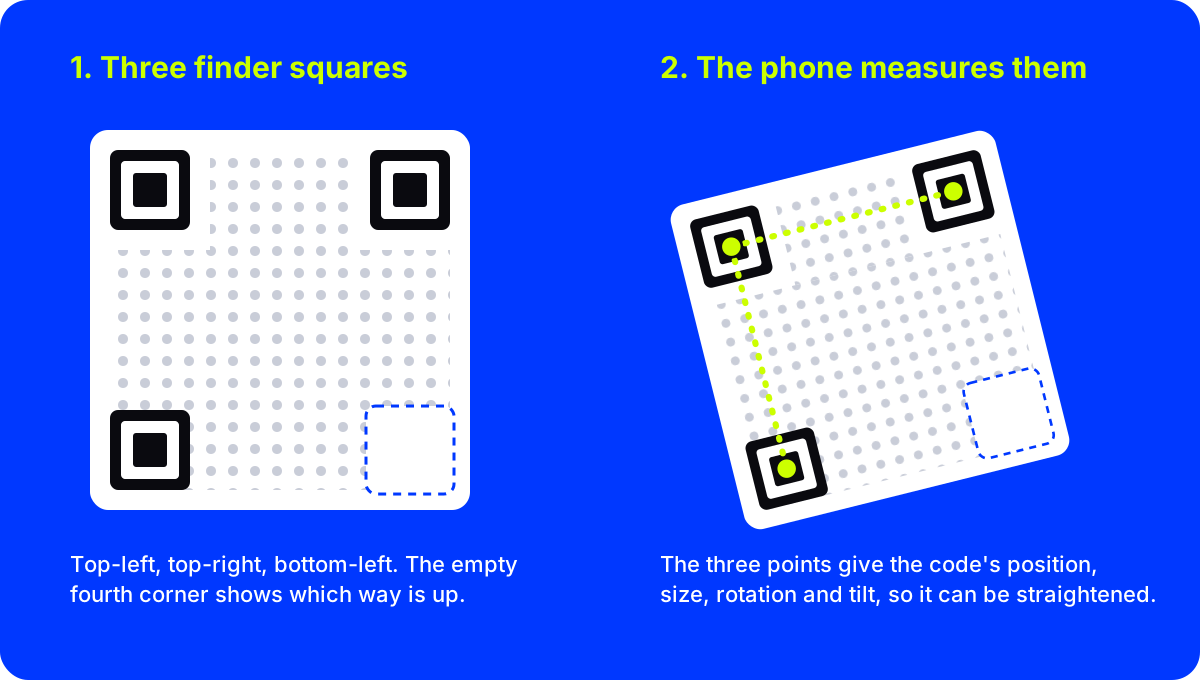
What do the three squares tell your phone?
Think of them as three pins on a map. Together they answer four questions.
- Where is the code? The squares mark its location in the frame, even when it fills only a corner of the picture.
- How big is it? The distance between the squares tells the phone how large the code appears, so it can work out the grid inside, whether you are close up or across the room.
- Which way is up? Three corners are marked and one is not. The empty corner tells the phone how the code is turned, so it reads correctly upside down or sideways.
- How is it tilted? Hold your phone at an angle and the squares look skewed. The phone measures that skew and straightens the code in software before reading it.
That last point is why you never have to line your phone up like a supermarket scanner. The squares let the phone correct the view for you.
Larger codes often carry one more, much smaller square near the fourth corner. It helps the phone keep its place when a code is printed on a curved or slightly warped surface, such as a bottle or a paper bag.
Why three squares and not four?
Four identical squares would be symmetrical, and that is the problem. A code with the same mark in every corner looks the same after a quarter turn, so the phone could not tell top from bottom.
Two squares would not be enough either. Two points give you a line, but not the angle of the surface the code sits on.
Three points in an L shape give the phone the position, the size, the rotation and the tilt all at once. It is the smallest number of marks that does the whole job.
That design goes back to the team at Denso Wave that introduced the QR code in 1994, to track car parts on busy factory lines. Reading quickly from any angle was the whole point. The story of how it started, and why anyone can use it, is in the history of the QR code.
Can you change the corner squares on a QR code?
Yes, within limits. The squares do not have to be sharp black blocks. They can be rounded, colored or drawn as circles, and phones still find them, as long as the basic structure stays clear: a solid center, a light ring, a dark ring, and strong contrast with whatever is around them.
Codes go wrong when the squares get lost. The common mistakes are easy to avoid:
- Covering a corner with a logo, a sticker, a price tag or a line of text.
- Low contrast, such as pale yellow squares on white, or dark navy squares on black.
- Cropping too tight, so a corner square touches the edge of the print or the artwork around it.
- A busy background running right up to the corners, so the squares melt into the scene.
If you want more detail on what you can safely change, our guide on whether a QR code can be any shape or color walks through colors, dots and inverted codes.
Why AriaQR keeps the three squares clear
AriaQR turns a picture into a scannable QR code. The image stays the image, and the code lives in it as a field of dots. You can see it below: the painting fills the code, but the three corner squares sit clean in their corners.
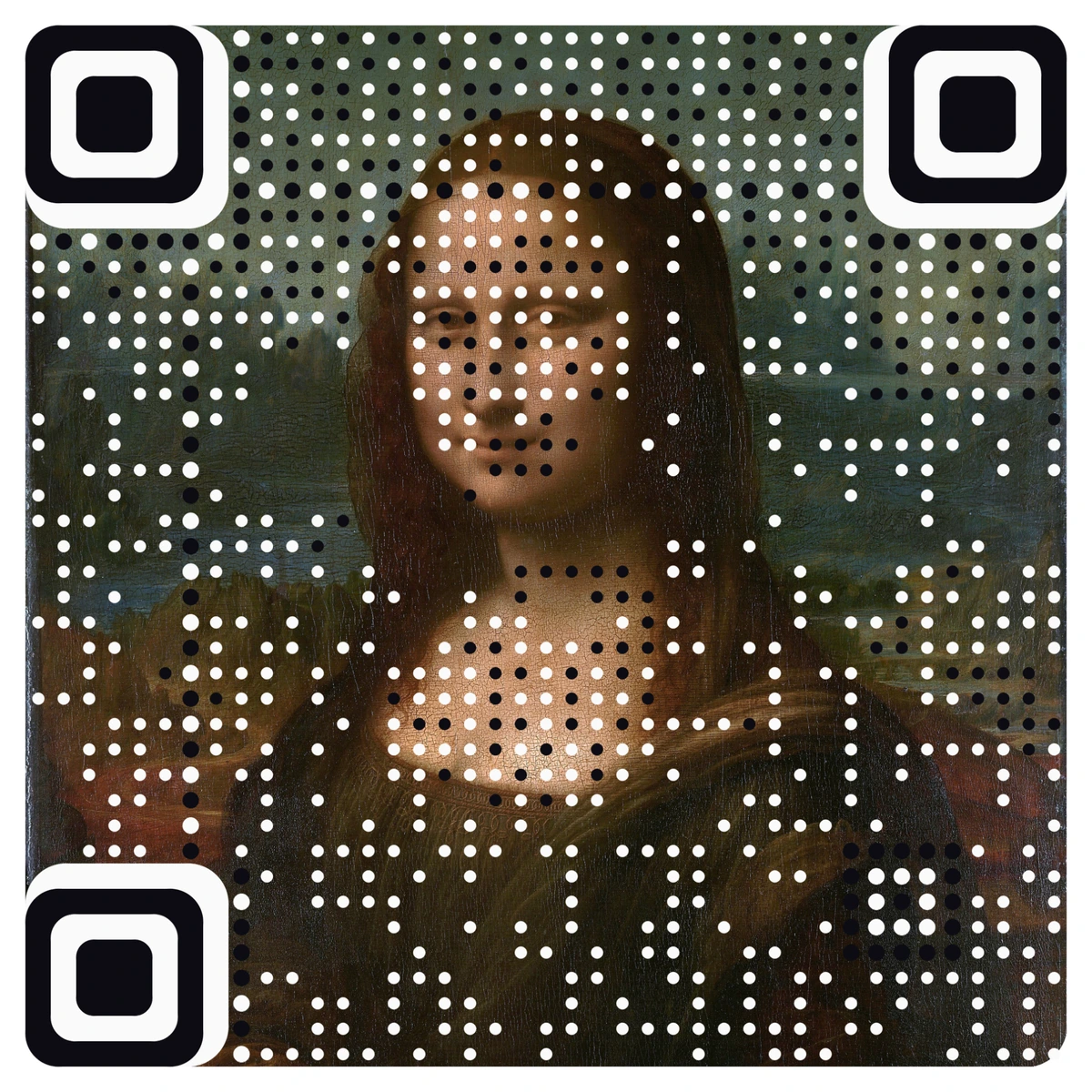
That is deliberate. The corner squares are the first thing a phone looks for, so they stay obvious while the rest of the code becomes a picture. You can still restyle them, rounded or square, in your brand color, and the code underneath stays the same. Every code is verified on real decoders under real-world conditions before you download it.
You can browse more examples in the artistic QR code generator, from famous paintings to brand logos. If you are curious about what happens after the phone finds the corners, what happens when you scan a QR code follows the rest of the journey, from the camera to the page that opens.
Where to start
Look at the next QR code you see and find the three squares. Then check your own designs against them: keep every corner visible, keep the contrast strong, leave a clear margin around the code, and test a printed proof on two different phones before you print in bulk.
When you want a code that looks like your brand instead of a black-and-white grid, start from your own picture.