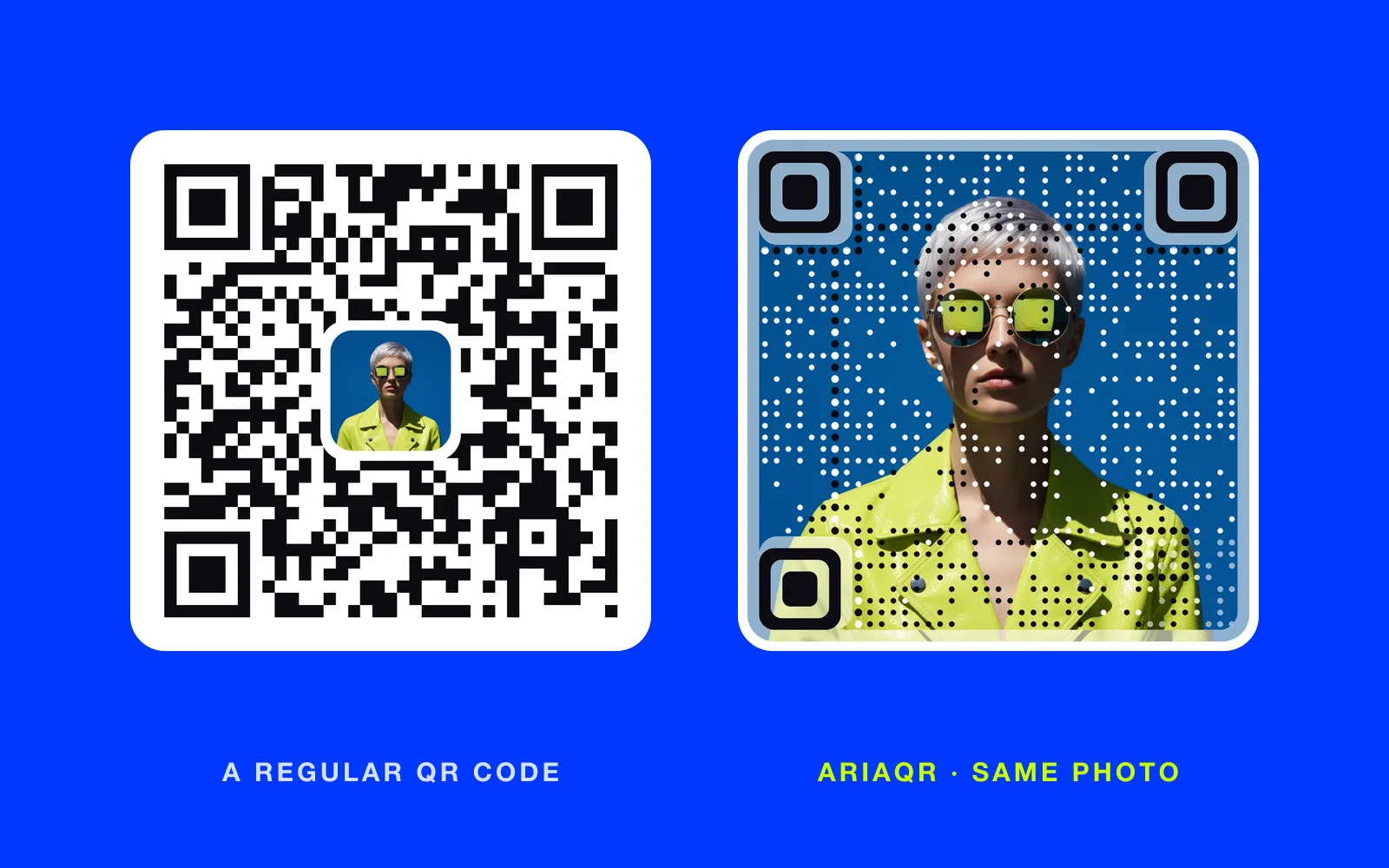
A regular QR code is a grid of black squares on a white background. A custom QR code with image is a picture that also scans: your photo, illustration, or logo stays exactly as it is, and the code lives inside it as a field of dots. Both send a phone to the same place. What changes is how the code looks, how it is checked before you print it, and what you can do with it afterward.
What is the difference between a regular QR code and an image QR code?
A regular QR code is the pattern everyone recognizes. A generator takes your link, turns it into a grid, and hands you a black-and-white square. It is fast, free almost everywhere, and any camera reads it. It also looks like every other code on the wall.
"Image QR code" covers three quite different things, and it helps to separate them before you compare tools.
A logo in the middle. The grid stays a grid, and a small logo is pasted over the center. This is what most "qr code with picture in the middle" tools produce. It is a regular code with a badge on it.
Colored or reshaped modules. The squares become dots, the black becomes your brand color, the corners get rounded. Still a grid, still recognizable as a QR code from across the room.
The code is the picture. You upload an image and the code is built into it. Your product shot, portrait, or poster is what people see, and the dots are part of the picture. This is what AriaQR does. Standard codes are square. "Code in your image" places the code inside a larger poster or photo and returns the whole artwork with the code blended in.
The third kind is what most people mean by a qr code that looks like a picture, and it is the one where reliability matters most.
Can you put an image in a QR code?
Yes, and the question has two answers depending on which direction you mean.
Putting an image in a QR code is the logo overlay. Almost any custom qr code generator with image support does this. It works, within limits: the logo has to stay small, and the code around it is still a plain grid.
Putting a QR code in an image is the reverse, and it changes the design conversation. A full-bleed product photo on a box can carry the code without a white square stamped in the corner. A speaker's portrait on a conference banner can be the link to their talk. A wedding invitation can use the couple's photo instead of a black-and-white block.
On AriaQR, the finder eyes and margins are translucent, so the image shows through everywhere. After generation you can change the eye shapes, dot shapes, and colors; the code, link, and analytics stay the same, so a restyle never means a reprint.
Does a custom QR code with image scan as well as a regular one?
Here is the honest answer. A plain grid, printed large on white paper, is the easiest thing a phone camera can read. Any decorated code has to earn its reliability, and most tools never check whether it did.
With a logo overlay from a free tool, nobody tests the result. You download it, print two thousand flyers, and find out at the event. With a diffusion-style AI generator, the picture can be stunning and still fail on a real phone at a real size; we cover that separately in AI diffusion QR codes vs AriaQR.
AriaQR treats scanning as the product, not the art. Every code is verified on real decoders under real-world conditions before you can download it. The site shows a verdict: "verified" or "scans up close only". If the verdict is not what you need, you know before you pay for print.
There are two builds: Standard for screens and prints of 4 cm and up, and Small print, verified down to about 1.5 cm for cards, labels, and stickers. How we verify every code explains what each verdict means in practice.
Regular QR code vs AriaQR at a glance
| Regular QR code | AriaQR | |
|---|---|---|
| What people see | A black-and-white grid | Your image, with the code inside it |
| Checked before download | Usually not | Verified on real decoders under real-world conditions |
| Verdict shown | No | "Verified" or "scans up close only" |
| Small print | Depends on the tool | Small print build, verified down to about 1.5 cm |
| Change the destination after printing | Only with a dynamic service | Dynamic by default |
| Scan analytics | Only with a dynamic service | Included: scans, unique visitors, location, device, placements |
| Restyle without a new code | Rarely | Eyes, dots, and colors change; the code stays the same |
| Works with any camera | Yes | Yes |
What stays the same?
More than you might expect. AriaQR makes the same 16 kinds of code a regular generator does, from website, WhatsApp, and contact card to Wi-Fi, payment, PDF menus, video, and Google review. Any camera or scanner app reads them; there is nothing to install.
Codes are dynamic by default, which means the code holds a short link, the destination can be changed after printing, and every scan is tracked. Wi-Fi and payment codes are static by design so they work offline in any scanner. The trade-offs are covered in dynamic vs static QR codes.
When should you still use a regular QR code?
Sometimes a plain grid is the right call: a receipt, a shipping label, a dense form where nobody expects design, or an internal document you need in ten seconds. If there is no image worth showing, a black square is honest. If a compliance team wants the standard look, give it to them.
Where the code is part of something people are meant to look at, such as packaging, posters, menus, invitations, or a creator's profile card, the picture version earns its place. Branded QR codes for packaging walks through the packaging case in detail.
How do you make a custom QR code with image?
Can you make custom QR codes without a designer? Yes. On AriaQR it takes a few minutes, whether you think of it as a custom image QR code maker or simply a way to make a QR code for a picture you already have.
- Choose the kind of code: website, WhatsApp, contact card, and so on.
- Enter the destination.
- Upload your image. For a square code, use a photo, logo, or illustration. For "Code in your image", upload the full poster or photo and choose where the code sits.
- Wait for the verdict. Pick Standard or Small print depending on the final size.
- Adjust eye shapes, dot shapes, and colors if you want. The code does not change.
- Download the 2048px master PNG, with or without a white border. For "Code in your image", you get the full artwork too.
No account is required to make or buy a code; sign in if you want every code in one place with its analytics.
Where to start
Take the image you already use on your packaging, your poster, or your profile, and make a code from it. Read the verdict before you commit to print. If the code will be smaller than a coin, choose Small print. If you plan to make codes regularly, see pricing for the subscription; otherwise pay once for the single code you need.