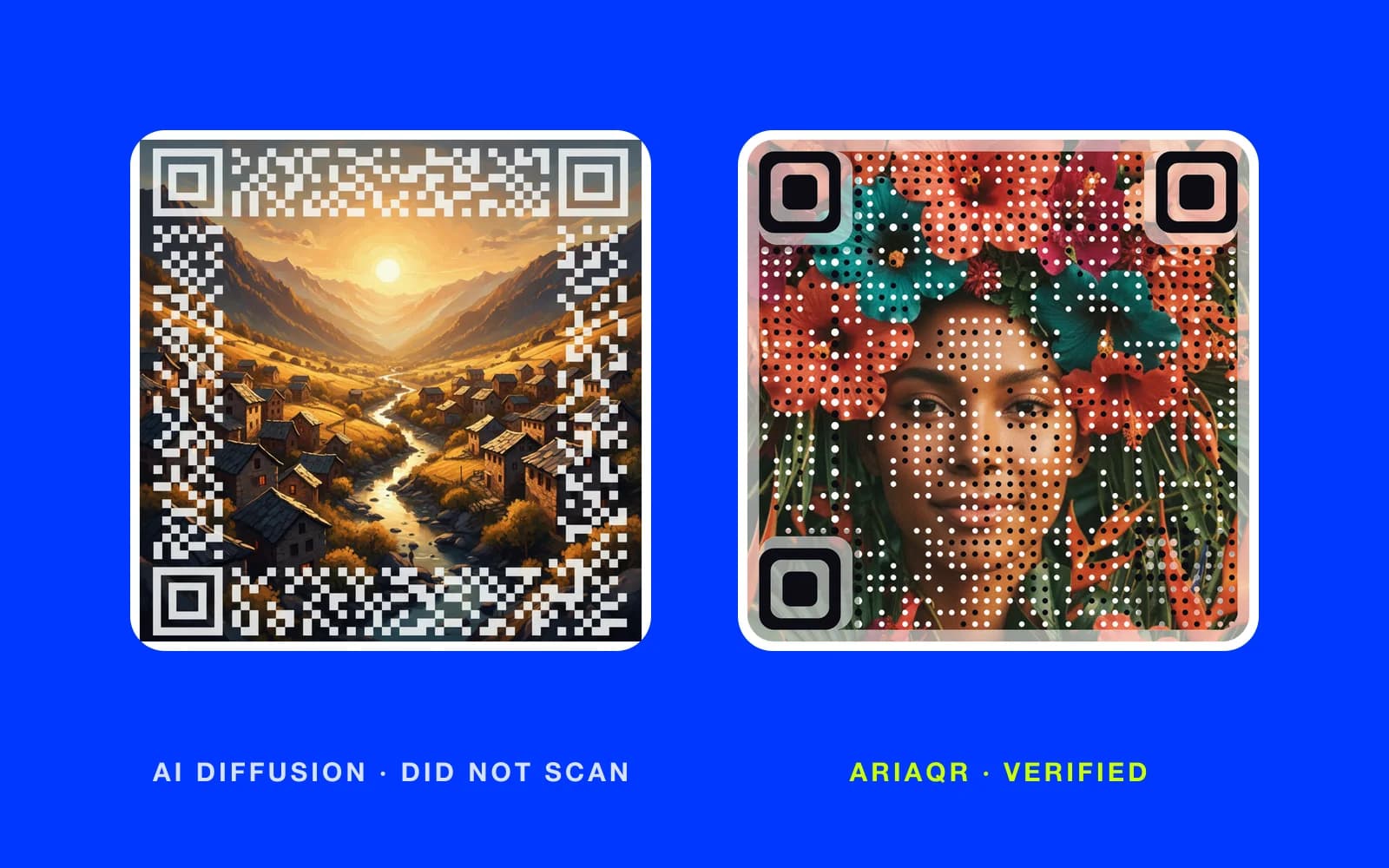
An AI QR code generator makes a picture from a text prompt and works a QR code into it. The best results are genuinely beautiful: a mountain village whose rooftops are also a code, a coffee cup where the pattern hides in the crema. The problem is that many of these codes do not scan on a real phone at a real size, and none of them can be edited or tracked once they exist. AriaQR starts from your own image, verifies every code on real decoders before download, and makes the link dynamic.
What is an AI QR code generator?
The category grew out of Stable Diffusion and the control models built around it. You give the tool a prompt, such as "watercolor lighthouse at dusk", and a link. It returns an image that looks like the prompt and, if things go well, reads as a QR code. There are Hugging Face demos, phone apps, and web tools. Some are free, some sell credits, and app stores are full of "premium" versions of the same idea.
The artistic QR code that comes out is a new picture every time. Run the same prompt twice and you get two different images, two different codes, and two different answers to the question of whether it scans.
This post does not go into how either approach works. The useful comparison is about outcomes: what you get, whether it reads, and what you can do with it afterward.
Why do AI generated QR codes often fail to scan?
The tool is optimizing for a good-looking image. The code is a constraint it tries to respect, and sometimes the art wins.
The pattern most people run into looks like this. The image scans from your monitor, at full size, with the phone held steady. Then you print it on a flyer at five centimeters, someone points a phone at it from a standing position in a dim bar, and nothing happens. Or it works on one phone and not another. Or it works head-on and fails at a slight angle.
There is no verdict. Nobody tells you which of your twelve renders are safe to print. You test each one on whatever phones you own, pick the one that seemed to work, and hope the phones you did not test behave the same way.
Two more practical issues. First, the link is baked into the picture. If the URL changes, or the campaign ends, the artwork is dead, and the replacement you generate will look nothing like the old one. Second, there is no scan count. You will never know whether the poster worked.
None of this makes the art worse. It makes it risky as a printed link.
What does AriaQR do differently?
AriaQR is not an AI QR code generator with image prompts. It starts from the image you already have: a product photo, a portrait, a poster, a logo, an illustration your designer made. The picture stays the picture, and the code lives in it as a field of dots. For a full poster, "Code in your image" places the code inside the larger artwork and returns the whole thing with the code blended in.
Every code is verified on real decoders under real-world conditions before you can download it. The site shows one of two verdicts: "verified" or "scans up close only". You see it before you pay for print. How we verify every code explains what the verdicts mean and what to do with each.
There are two builds: Standard for screens and prints of 4 cm and up, and Small print, verified down to about 1.5 cm for cards, labels, and stickers.
Codes are dynamic by default. The code holds a short link, so the destination can be changed after printing and every scan is tracked: totals, unique visitors, scans per day, an hour-of-day heatmap, device and OS, location down to city where the network allows, and a real map. If you run one campaign across several posters, placements let you compare them side by side. QR code analytics, explained covers what each number means.
You can also restyle a code after it exists. Eye shapes, dot shapes, and colors change; the code, link, and analytics do not.
AI QR code art vs AriaQR at a glance
| AI diffusion QR code | AriaQR | |
|---|---|---|
| Source image | Generated from a prompt | Your own photo, logo, or artwork |
| Consistency | New picture every run | The same image, every time |
| Checked before download | No | Verified on real decoders under real-world conditions |
| Verdict shown | No | "Verified" or "scans up close only" |
| Small print | Rarely reliable | Small print build, verified down to about 1.5 cm |
| Change the link after printing | No | Yes, dynamic by default |
| Scan tracking | No | Included |
| Payment and Wi-Fi codes | Possible, untested | Static, work offline, verified |
| Best at | One-off art | Printed links that must work |
When is an AI diffusion QR code the right choice?
Be fair to the format. If you want a scene that does not exist yet, a prompt is the fastest way to get it. If the code is decoration on a social post and the link is in the caption anyway, a scan failure costs nothing. If it is a personal project, an album cover concept, or a piece for your wall, the art is the point and reliability is a bonus.
Creators sit right on the line. A release artwork with a code in it can be a diffusion image if it only lives on Instagram, but the version printed on merch or a gig poster should be verified. Spotify code art and creator QR codes goes through that split.
Where an AI generated QR code is the wrong choice: packaging, print ads, menus, business cards, event signage, real estate signs, and anything you cannot easily reprint. In those places the link is the job, and the picture serves it. Regular QR codes vs AriaQR covers the plain-grid end of the same decision.
Can an AI QR code generator make a payment code?
People search for an AI QR code generator for payment, and technically the tools accept any text, including a payment string. Think about the failure mode before you do it. A payment code that fails once at a counter is a lost sale and an awkward thirty seconds. On AriaQR, UPI payment and Wi-Fi codes are static by design: the payload is baked in, they work offline in any scanner, and they are verified like every other code. Dynamic vs static QR codes explains why those two kinds stay static while everything else is dynamic.
Where to start
If you already have a diffusion code you love, keep it for the screen and make a verified version of the same image for print. If you are starting fresh, upload the picture your brand already uses and read the verdict before you order anything. Making a code needs no account; see pricing if you expect to make more than one.