API, MCP and webhooks
Webhooks: send leads and alerts to your tools
1 min read·Updated October 27, 2026
Short answer
A webhook is an address in another tool (Zapier, Make, Slack, Discord, Google Sheets, your CRM) that AriaQR sends a message to. Use one for every new lead from a page, and one for a code’s scan alerts.
A visitor sends the form
AriaQR
Posts the lead as JSON
Your tools
ZapierSlackSheetsCRM
New leads from a page
- 1Open the page’s Leads.
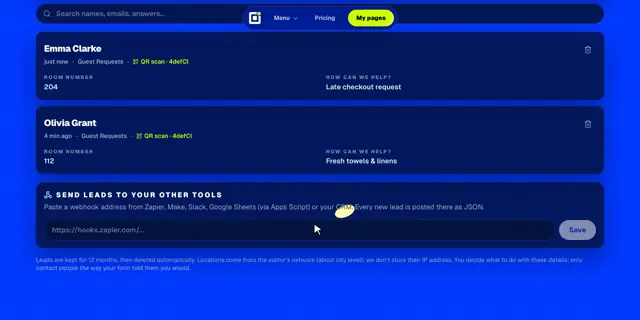
- 2Under Send leads to your other tools, paste the webhook address (it must start with https://).
- 3Click Save. Every new lead is posted there as JSON.
json
{
  "event": "lead",
  "page": { "id": "pg_3kd92", "title": "Guest Guide | Harbor & Pine" },
  "form": "Guest Requests",
  "received": "2026-10-26T18:41:09.000Z",
  "fields": { "Your name": "Emma Clarke", "Room number": "204", "How can we help?": "Late checkout request" },
  "source": "qr",
  "code": "4defCl",
  "country": "US",
  "city": "Portland",
  "text": "*New lead · Guest Guide | Harbor & Pine*\nYour name: Emma Clarke\nRoom number: 204\nHow can we help?: Late checkout request",
  "content": "**New lead · Guest Guide | Harbor & Pine**\nYour name: Emma Clarke\n…"
}text is already formatted for Slack and content for Discord, so a Slack or Discord webhook shows a readable message with no setup. Lead webhooks are part of Business.
Scan alerts from a code
In a code’s report, Settings → Alerts → Webhook URL gets the first scan, a broken destination and the daily or weekly digest. See scan alerts.
json
{
  "title": "First scan on your AriaQR code 4defCl",
  "text": "*First scan on your AriaQR code 4defCl*\nSomeone just scanned it from Portland, US on iOS.\nhttps://ariaqr.com/account",
  "url": "https://ariaqr.com/account",
  "content": "**First scan on your AriaQR code 4defCl**\nSomeone just scanned it from Portland, US on iOS.\nhttps://ariaqr.com/account"
}Good to know
- Each message is sent once, as a POST with
Content-Type: application/json, and waits up to 8 seconds. It isn’t retried, so use a tool that’s always on. - Google Sheets: deploy a small Apps Script web app and paste its URL.