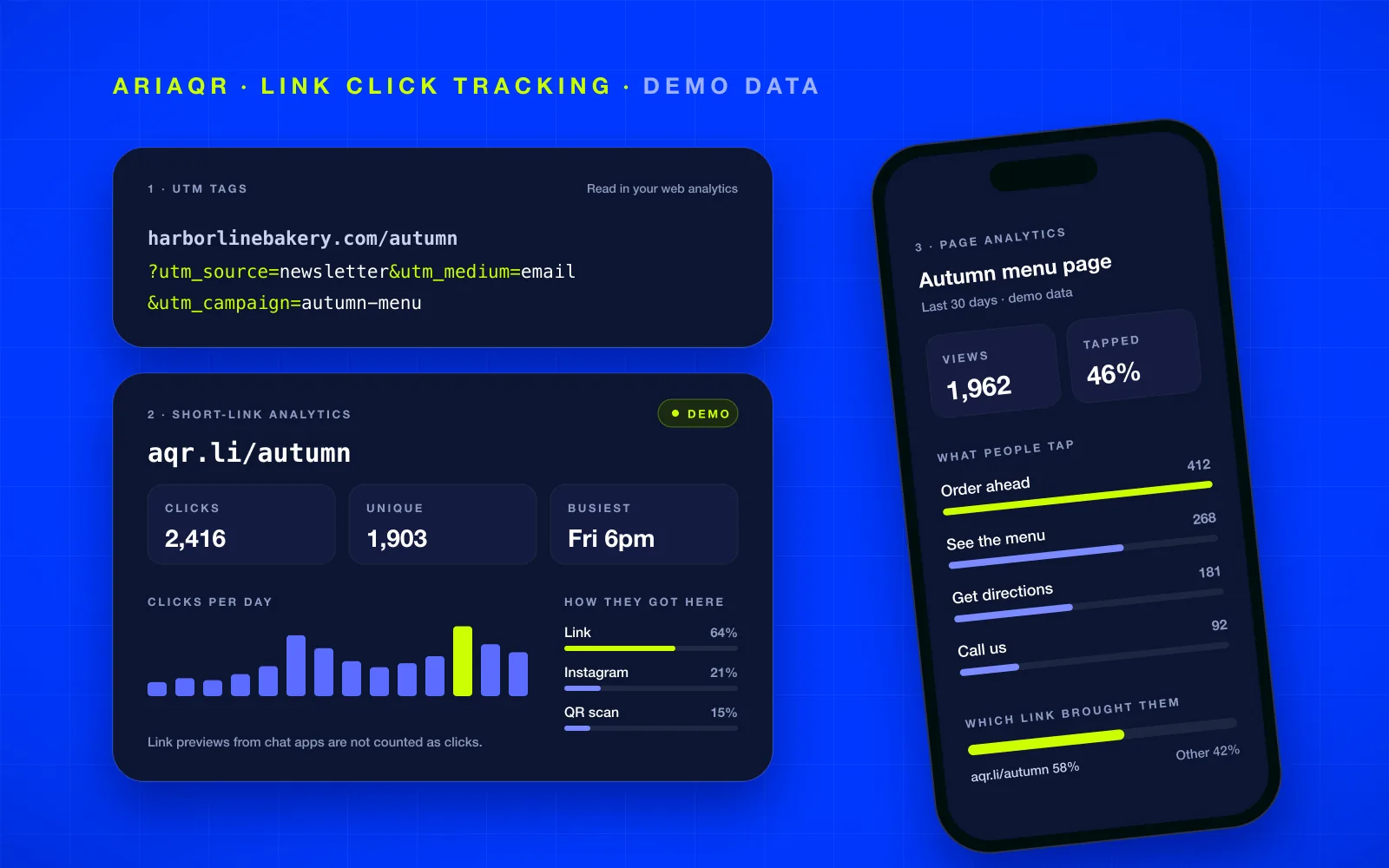
To track link clicks, you have three tools, and each one sees a different part of the visit. UTM tags label a link so your own web analytics can tell where a visitor came from. A short link counts the click itself, on any destination. Page analytics shows what people did once they arrived. Most campaigns need one or two of them, not all three. Here is how to pick.
What are the ways to track clicks on a link?
Think of a click as a short trip with three stops:
- The click. Someone taps the link in an email, a bio, a chat, or a QR code.
- The arrival. The destination page loads.
- The visit. They read, tap, book, buy, or leave.
Each tracking method sits at one stop:
- Short-link analytics sits at the click. The short link is a redirect, so every tap passes through it and is counted before the page even starts loading.
- UTM tags are read at the arrival. They are labels on the URL that your web analytics, such as Google Analytics, reads when the page loads.
- Page analytics watches the visit: which buttons people tap, how far they get, whether they convert.
Knowing which stop answers your question tells you which tool to use.
How do UTM tags work?
UTM tags are plain text added to the end of a URL. A newsletter link might look like this:
harborlinebakery.com/autumn?utm_source=newsletter&utm_medium=email&utm_campaign=autumn-menu
The page ignores the tags, but your web analytics reads them and files the visit under that source, medium, and campaign. In Google Analytics 4, you find them in the traffic acquisition reports.
UTM tags are the right tool when:
- The destination is your own website, and it already runs analytics.
- You want clicks from the link to sit next to everything else your site measures, such as sales, sign-ups, and time on page.
They fall short when:
- The destination is not your site: a ticketing page, a booking platform, a shared document, a marketplace listing. You cannot read their analytics.
- Visitors leave before the page loads, or block analytics scripts. Those visits never reach the report.
- Someone edits or strips the tags when they copy the link, which happens often in chats.
- You need the tags to be consistent. "Email", "email", and "e-mail" become three different rows.
How does short-link click tracking work?
A short link is a small redirect. When someone opens aqr.li/autumn, the shortener counts the click and sends them on to the destination in the same moment. Because counting happens at the redirect, it works for any destination, whether you own the site or not.
On the aqr.li shortener, every link gets:
- Clicks over time, and unique visitors counted without cookies on the visitor.
- Countries and cities from the visitor's network, on a map.
- Devices, operating systems, browsers, and languages.
- In-app browsers, such as Instagram, WhatsApp, or Facebook.
- How people got there: a plain link, a QR code scan, or inside an app.
- The busiest hours of the week, in each visitor's local time.
- A CSV export of every click.
Two details matter more than they look. First, link previews are not counted: when you paste a link into a chat, the app fetches it to draw the preview card, and those fetches are not people. Second, a switch in the link's settings adds UTM tags on the way through, so the same click shows up in your web analytics as well. You do not have to choose one method or the other.
Short-link tracking is free on aqr.li for up to 10 links. The details, and the limits, are in free URL shortener with analytics.
What does page analytics add?
Short-link analytics stops at the door. It knows someone arrived; it does not know whether they booked a table. For that you need analytics on the page itself.
If the page is your own site, that is your existing web analytics, with UTM tags telling it where visitors came from. If you build the page in AriaQR, landing pages count views and every tap on every button and link, with no cookies and no consent banner. Our post on tracking what people tap after they scan shows that layer in detail, and landing pages built in AriaQR get an aqr.li address of their own.
Which method should you use?
| Your situation | Use | Why |
|---|---|---|
| Linking to your own site that already runs analytics | UTM tags, plus a short link if you want the click count | Visits sit next to sales and sign-ups |
| Linking to a site you do not control | Short link | The only place you can count the click |
| Comparing channels: newsletter vs Instagram vs a poster | One short link per channel | Each channel gets its own clean count |
| Link in a bio or a story | Short link | Shows in-app opens and when people tap |
| Printed material | A tracked QR code for the same destination | Scans get their own count, next to the link's clicks |
| You need to know what people did after arriving | Page analytics | Clicks cannot tell you about the visit |
The pattern most teams settle on: one short link per channel for counting, UTM tags turned on for the sites you own, and page analytics wherever the conversion happens.
How do you track link clicks in email, on Instagram, and on LinkedIn?
The method is the same everywhere: give each place its own link.
- Email. Your email platform counts clicks too, but some mail security tools open links to check them before the reader does, which can inflate counts. A short link that filters automated visits gives you a second, cleaner number. Use a different link for each send if you want to compare them.
- Instagram. Put a short link in your bio or a story. The dashboard shows how many people opened it inside Instagram's in-app browser, which also tells you to test your page there, not just in a regular browser.
- LinkedIn, X, and other networks. These platforms show their own link-click numbers inside their apps. A short link adds a count you control, in one place across every network.
- Chats and messages. Here, short links matter most. There is no platform report at all, and the link gets forwarded. The dashboard is the only record of how far it traveled.
For campaigns with several printed placements, the same idea applies to QR codes: one code per poster, compared side by side. See placements and campaign tracking.
Why don't click numbers match between tools?
Because each tool counts at a different stop. Expect differences, and read them as information:
- Clicks above sessions. Some people tap and leave before the page loads, often on slow mobile connections. The short link counts them; web analytics does not. A big gap points to a slow page.
- Blocked scripts. Browsers and extensions that block analytics hide visits from page-side tools but not from a redirect.
- Total vs unique. One person can click three times. Compare uniques to uniques.
- Previews and bots. A tool that counts link previews will run high. aqr.li does not count them.
- Time zones. A daily chart in your time zone and one in UTC split days differently.
A worked example
Take a fictional bakery in Burlington, Vermont, launching an autumn menu. The numbers are for example only, not real data.
The owner makes two aqr.li links, both pointing at the menu page: one for the newsletter and one for the Instagram bio. From the shortener she also makes a free QR code for the same page, for the counter card, and it counts its own scans. UTM tagging is switched on for both links, so the visits also appear in the bakery's own web analytics.
After two weeks, for example: the newsletter link has 620 unique visitors, most in the first two days. The Instagram link has 410, spread evenly, and almost all of them opened inside Instagram's browser. The counter card has 180 scans, peaking on Saturday mornings.
What the owner changes: the newsletter is clearly the launch driver, so the next menu goes out by email first. The menu page gets tested inside Instagram's browser, where most bio visitors see it. And the Saturday-morning peak on the counter card becomes the slot for a weekend special. None of it needed new tools, just one link per place.
Where to start
Pick the link you are about to share and make one short link per place you will share it. Open the URL shortener, sign in with an email code, and turn on UTM tagging if the destination is your own site. To strip someone else's tracking tags from a link before you share it, use the free URL cleaner. Check the dashboards after a few days, compare uniques to uniques, and keep the channel that brings people who stay. For more free utilities around links and codes, browse the AriaQR tools.