
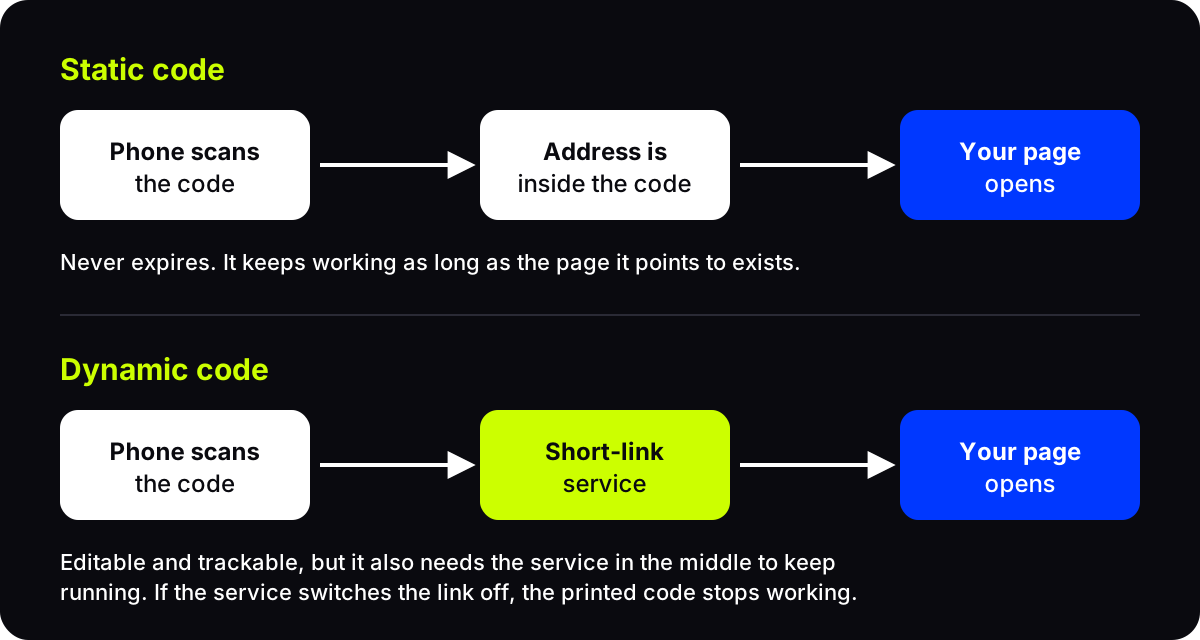
Do QR codes ever expire? A static QR code never does: the link is stored in the pattern itself, so it works for as long as the page it points to exists. A dynamic QR code can stop working, because it relies on a short-link service that has to keep running, and some services switch codes off when a trial or plan ends.
That difference matters most after you have printed. Here is how to tell which kind you have, and what to check before you order a box of flyers.
Do QR codes ever expire?
A QR code is just a pattern of dark and light squares. Patterns do not have expiry dates. A code printed in 2015 reads the same way today.
What can expire is something the code depends on. There are only two candidates:
- The destination. The page was deleted, the shop moved its website, or the domain was not renewed. The code still scans, but it opens an error page.
- The service in the middle. With a dynamic code, the phone first goes to a short link, and that short link sends it on to your page. If the service stops redirecting, the chain breaks.
So the real question is not "does a QR code expire" but "what is my code relying on, and could that stop?"
Static QR codes never expire
A static code holds its content directly. A website address, a Wi-Fi password or a contact card is written into the pattern, and any phone can read it without asking a server for anything.
That makes static codes very durable. No company can turn them off, and Wi-Fi and contact codes even work offline.
The trade-offs are real, though:
- You cannot change it. If the address is wrong or the page moves, you reprint.
- You cannot count scans. Nothing sits between the phone and the page, so there is nothing to record a visit.
- Long content makes a denser code, which is harder to print small.
Static is a good fit for things that rarely change, like a Wi-Fi code in a rental apartment or a contact card on a business card.
Why dynamic QR codes can stop working
A dynamic code holds a short link instead of your final address. When someone scans, the short link looks up where it should go today and sends them there. That is what lets you edit the destination after printing and see how many people scanned.
It also means the code depends on that service. A dynamic code can stop working if:
- a free trial ends and the provider deactivates the link,
- a paid plan lapses and the codes are paused or redirected to the provider's own page,
- the account is closed or deleted,
- the provider itself shuts down.
Not every provider behaves this way, and many are upfront about it. The point is to know before you print. Our guide to dynamic vs static QR codes covers the trade-offs in more depth.
How to tell if your QR code will expire
Run through these before a big print order:
- Scan it and read the address. If the phone shows your own website, the code is probably static. If it shows a short link on someone else's domain, it is dynamic.
- Read the terms. Look for what happens to printed codes when a trial ends, when you downgrade, or when you stop paying.
- Check whether you can change the destination. If you can, the code is dynamic and depends on that account.
- Check the destination too. A code is only as good as the page behind it. Pick a page you control and plan to keep. What a QR code should link to has practical options.
Do AriaQR codes expire?
Here is how it works on AriaQR, kind by kind.
- Picture codes bought as a single code. You pay once, and the code is yours for life, with an editable link and analytics.
- Codes on a plan. A printed code keeps scanning even if the plan ends. Editing the destination and analytics pause until you renew.
- Free classic codes. The free QR code generator makes plain codes with an editable link and analytics. Each one lives for a year and renews free with one click from a reminder email. You sign in so that reminder can reach you, and you can keep up to 10 at a time. If nobody renews, the code pauses and shows a notice instead of redirecting, and it can still be brought back for a short while before it is removed.
- Wi-Fi and payment codes. These carry their details inside the code, so they work offline and do not depend on a short link at all.
The destination still matters. AriaQR checks links daily and can alert you by email or webhook if a destination breaks, so a moved page does not quietly waste a print run.
Where to start
Decide first whether you need to edit or track the code later. If not, a static code is the simplest choice and will never expire. If you do, choose a dynamic service whose terms you have read, point the code at a page you control, and put a reminder in your calendar for any renewal date.