Teams and bulk
Teams and shared workspaces
1 min read·Updated October 27, 2026
Short answer
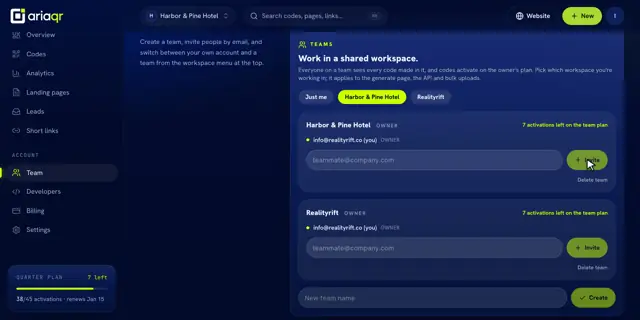
On Business, create a team in Dashboard → Team and invite people by email. Everyone sees every code made in the team, and codes activate on the owner’s plan. Switch workspaces from the menu at the top.
Owner
Pays the plan. Every code made in the team activates on it.
Shared workspace
Harbor & Pine Hotel
Member
Sees and makes every code in the workspace.
Member
Create a team and invite
- 1Open Team in your dashboard.
- 2Type a New team name and click Create.
- 3Type a teammate’s email and click Invite. They get “Invitation to join … on AriaQR” and choose Accept or Decline.
Switch workspaces
The workspace menu at the top switches between Personal and each team. Codes you make go to the workspace you’re in.
Roles and limits
- Owner, admin and member. The owner or an admin can invite and remove people.
- Up to 25 members per team; a person can be in up to 5 teams.
- Leave team: your codes stay with the team owner. Delete team (owner only): every code returns to the owner’s own account.
Creating teams is part of Business. Anyone can accept an invitation.