API, MCP and webhooks
API keys
1 min read·Updated October 27, 2026
Short answer
Create a key in Dashboard → Developers → “New key”. It starts with aq_ and is shown once, so copy it straight away. Keys on the quarter plan can read; Business keys can also create and change. 60 requests a minute.
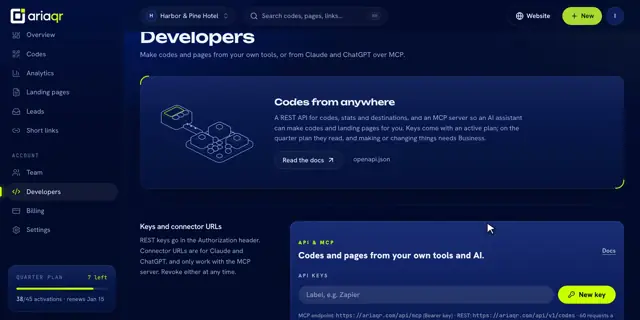
Create a key
- 1Open Developers in your dashboard.
- 2Type a label like “Zapier” and click New key.
- 3Copy it from “Your new key — shown once”. We only keep a fingerprint, so it can’t be shown again.
Use and look after it
- Send it as
Authorization: Bearer aq_…with every request. - The list shows each key’s start, when it was created and last used.
- Click the bin to revoke a key. It stops working immediately.
- Up to 10 keys and 10 connector URLs.
Good to know · Treat a key like a password. Never put it in a web page or share it in a chat.
Keys for AI assistants are different: see connect Claude or ChatGPT.