Are short links safe? Most of the time, yes. A short link is just a redirect: it sends you on to a longer address. The danger is not the shortener, it is that the shortener hides the destination, and scammers use that. The fix is simple: see where a link really goes before you open it, and pick shorteners that check the links they host.
Why are shortened links risky?
A normal link shows you where it goes. You can read "yourbank.com" and decide. A short link shows you only the shortener's domain and a few random letters. Whether it ends at a bakery's menu or a fake login page, it looks the same.
That makes short links useful for scams in a few specific ways:
- Hiding a bad domain. A lookalike address such as "yourbank-secure-login" is easy to spot in full. Behind a short link, you never see it.
- Anonymous links. Shorteners that let anyone make links with no account are the easiest place to put a scam. Nothing ties the link to a person.
- Chains of redirects. One short link points at another, which points at a third. Each hop makes it harder for filters, and for you, to see the final page.
- Pages that change. A link can point at a harmless page when it is shared and at a bad one a week later, if the page itself is changed or taken over.
- Trust borrowed from the sender. The link usually arrives from someone you know, or someone pretending to be them, which is why it gets clicked.
None of this means you should avoid short links. Brands, schools, and governments use them every day. It means you should look before you tap.
How do you check if a link is safe before you click?
Work through these in order. Most links clear the first two in seconds.
- Check the sender. Did you expect this message? Is it from the person it claims to be from? A link from your own team in a work chat is different from a text about a parcel you did not order. When in doubt, ask the sender through another channel.
- See the address. On a phone, long-press the link to see the full address without opening it. On a computer, hover over it and read the address at the bottom of the window.
- Expand the short link. A link expander follows the redirect and shows you the real destination without your browser loading the page. Some shorteners also have their own preview: adding a plus sign to the end of a bit.ly link, for example, shows Bitly's info page for that link. Before you open anything, paste the address into the free link safety checker: it reads the link in your browser, without visiting it, and flags lookalike domains, raw IP addresses, the
@trick and hidden short links. - Read the domain carefully. Look at the part just before the first single slash. "paypal.com.account-check.info" is not PayPal; its real domain is "account-check.info". Watch for swapped letters, extra words, and odd endings.
- Check the destination's reputation. Paste the address into Google's Safe Browsing site status page on the Transparency Report. It tells you whether Google currently flags the site as unsafe.
- Do not trust the padlock alone. The lock icon means the connection is encrypted. It says nothing about who runs the site. Scam pages have padlocks too.
- Go direct for anything important. If a link asks you to sign in, pay, or confirm details, close it and type the site's address yourself, or use the official app.
Steps 1 and 2 catch most scams. Steps 3 to 5 are for links you cannot judge from the sender alone.
What should you do if you already clicked a bad link?
Clicking alone rarely does lasting harm on an up-to-date phone or computer. What does harm is what you do next. If you clicked something suspicious:
- Close the page. Do not enter anything, and do not download anything it offers.
- If you typed a password, change it now on the real site, and anywhere else you used the same one. Turn on two-step sign-in.
- If you entered card details, call your bank using the number on the back of the card.
- If a file downloaded, delete it without opening it, and run your device's security scan.
- Report the link to the shortener that hosted it, so it can be stopped for the next person.
Are some link shorteners safer than others?
Yes, and the difference is what the shortener does about bad links. A well-run shortener treats safety as part of the product, because a short domain full of scams gets blocked by mail filters and chat apps, and every honest link on it goes down too. When you choose one, or decide whether to trust one, look for:
- Accounts behind links. Fewer anonymous throwaway links.
- Checks on the destination, when the link is made and again later.
- No chained redirects, so the destination you see is the one you get.
- A way to report a link, and a visible response when people do.
How does AriaQR keep aqr.li links safe?
The aqr.li shortener is built so people are willing to open its links. In plain terms:
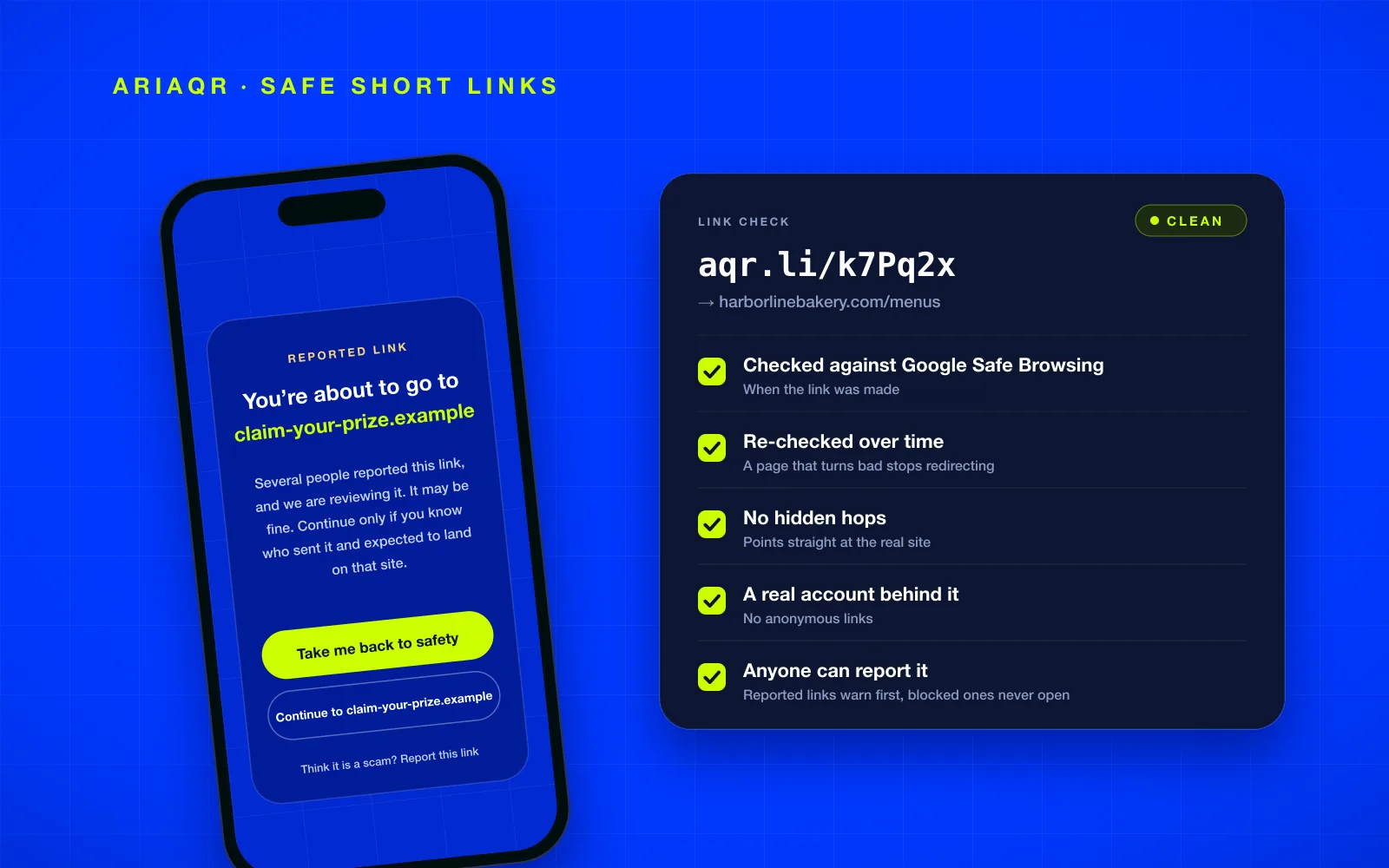
- A real account behind every link. There are no anonymous aqr.li links. You sign in with an email code or Google before you can make one, and there are limits on how many links an account or a network can make in an hour.
- Checked before it goes live. Every destination is checked against Google Safe Browsing when the link is made and whenever it changes. A flagged address is refused.
- Checked again over time. A page can turn bad after the link was made, so live links are re-checked. A link whose destination gets flagged stops redirecting.
- No hidden hops. An aqr.li link cannot point at another short link or redirect, or at an IP address. People land where the link says.
- Reports that change what visitors see. Anyone can report a link, no account needed. When several people report the same link, visitors see a warning page first, until a person has reviewed it. A harmful link is blocked for good, and a blocked link never redirects.
Free links also keep the destination they were made with, so a free link someone already trusts cannot quietly start pointing somewhere else. Changing the destination comes with a paid plan, and the new address goes through the same checks. The rest of the free plan is described in free URL shortener with analytics.
What does a reported link look like on aqr.li?
When a link is under review, the visitor sees a page before anything else loads. It says the link was reported and is being reviewed, names the site it leads to, and suggests continuing only if you know who sent it and expected to land there. It also reminds you never to enter a password or card details on a page reached this way unless you are sure it is the real one. There are two buttons: one back to safety, and one to continue to the named site. A link to report it sits underneath.
The warning does not accuse the link owner. Many reported links turn out to be fine. It gives the visitor the one thing a short link normally hides, the destination, and lets them decide.
Are QR codes the same risk as short links?
Very nearly. A QR code is a link you cannot read at all until you scan it, and dynamic QR codes usually go through a short link anyway. The same advice applies: most phone cameras show the address before opening it, so read it, and be wary of codes stuck over other codes on parking meters, posters, or restaurant tables. For businesses, the lesson runs the other way: point your code at a page people recognize. Our guide on what a QR code should link to covers that.
How do you report a bad short link?
Report it to the service that made it. Most well-known shorteners have an abuse or report page. For an aqr.li link or an AriaQR code, use the report page: paste the link, choose what is wrong, and send it. You do not need an account. You can also report phishing pages to Google Safe Browsing, which helps protect browsers everywhere.
Where to start
Next time a short link arrives that you did not expect, long-press it, expand it, and read the domain before you tap. If you are the one sharing links, use a shortener that checks every destination, so the people you send links to can trust them. The URL shortener makes free aqr.li links with those checks built in, and full click analytics on each one. If you see an aqr.li link that should not be there, report it.